From a Google Sheet to my own expenses app in 8 days
For a long time, handling money was a problem for me. I had what many would call a happy problem: my income started growing, and I never tracked what came in, much less what went out, especially in the form of debt. That imbalance was hard to fix, and the root cause is uncomfortable to admit: I never had any financial education, not even the most basic kind.
What pulled me out wasn’t an app. It was three money decisions fit for a 10-year-old that I, a salaried adult, had never applied:
- Write down every expense of the month, down to the smallest one.
- Write down the income.
- Do the subtraction from day 1 and look the number in the eye: is it green or red?
Then came the fourth piece, the one that changed the game the most. Many expenses aren’t paid the day the salary arrives. So how do you not spend that money in the meantime? The answer came from the banks themselves, with their pockets, boxes and vaults: set the money apart in a space where I don’t see it as available, locked if possible. In time I learned I was rediscovering a personal-finance classic: the envelope system. It didn’t just bring order to my expenses: it’s what has worked best for me to save.
That was about ten years ago, and since then the system evolved with whatever technology I had at hand: it started as one sheet of paper per month, became a notebook dedicated to it, and once I finally achieved consistency it moved into a Google Sheet called “Finance”, with one “Control Tower — Income / Expenses” tab per month. The ritual worked: duplicate the tab, adjust the amounts, mark things paid as the month went by.
And for about a year I’d been toying with turning it into an app. Because the Sheet, practical as it is, gets awkward to edit “in the moment” from a phone or tablet (tiny cells, wrong keyboard, a small daily punishment), and above all because it never notifies me of anything: a spreadsheet doesn’t know the rent is due tomorrow.
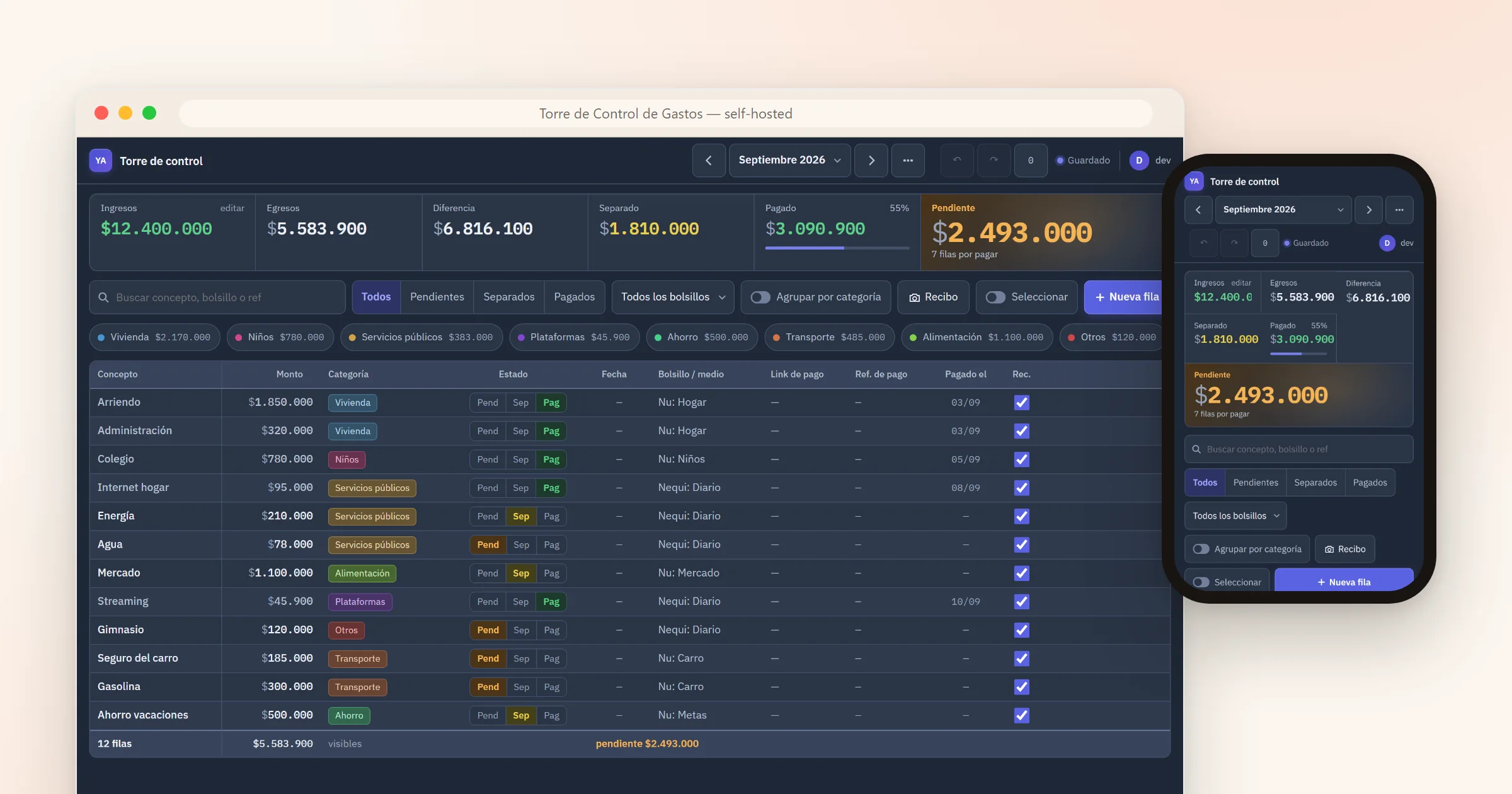
This is the second chapter of what I started telling in the pkmntools story: what happens when a solutions architect (not a professional developer) applies what he learned vibecoding with AI agents. Spoiler: the second time is much faster.
The failed attempt that taught the way
I first tried in May, and I did it wrong. I built a Next.js dashboard deployed on Vercel that read and wrote the Google Sheet through a service account. It grew big (almost five thousand lines, the expenses page alone was 1,600) and I abandoned it within two weeks.
The lesson took months to land: wrapping the spreadsheet doesn’t fix the ritual. The problem wasn’t the interface on top of the Sheet; it was staying tied to the Sheet’s model. And there was a second mistake, one of method: I started with code (“build me a dashboard”) instead of starting with design.
Eight days, with the full formula
On September 20th I started over, this time with the formula pkmntools left me: first a design spec with the decisions written down and their whys, then an implementation plan broken into tasks, then TDD execution alongside AI agents. Eight days and 109 commits later, the app is in daily use. These were the decisions and their reasons:
Everything on Cloudflare, everything on the free tier. A single Worker with Hono serves the API and the static files; data lives in Workers KV as one JSON document per month, exactly the Sheet’s mental model: one tab, one document. Concurrency is optimistic: every write carries the document’s version, and if two tabs edit at once, the second one gets a 409 and reloads. Hosting cost: zero.
Authentication without building authentication. The app has a single user (me), so there’s no sign-up, no passwords, no users table. Cloudflare Access protects the entire Worker with a one-time PIN by email and a policy allowing exactly one address. The app is private by design: there’s no URL to visit; this article is the only public thing it has.
A framework-free frontend. Vite + TypeScript and render functions over in-memory state. For a one-user app with a grid and a panel, React was dead weight. The PWA installs on the tablet, works offline showing the last month read, and amounts open the numeric keyboard.
Constraints as fuel. KV’s free tier caps listings at a thousand a day, so the app keeps its own month index in a separate document and never lists. CI runs on Linux because on Windows, Smart App Control blocks the local Workers runtime. And before every deploy, a Playwright smoke test runs across three viewports (desktop, tablet, phone) as a mandatory gate.
The ritual, improved rather than replaced
The design respects how I already managed my expenses, and only removes friction. Every expense sits in one of three states (pending, set aside, paid) because that’s how I think about money: “set aside” isn’t a margin note, it’s a real state, the envelope system turned into software: that money is already in its envelope, it just hasn’t left yet. And every expense carries its pocket, the name of the envelope it lives in. Swiping a row advances its state; marking paid stamps today’s date automatically; duplicating a month reproduces the old ritual in one tap; and everything has undo/redo with a history that survives page reloads.
And the thing the Sheet never did in ten years: notify me. At 8 a.m. a push notification arrives with what’s overdue and what’s coming. The best part is in the notification’s own buttons: “Paid” marks the expense with today’s date without opening the app, and “Snooze” reminds me again later. Half of my monthly bookkeeping happens through those two buttons.
The star: the receipt scanner
The feature I love most landed on day 7. I pay for something, the bank sends its notification, and I share the screenshot straight to the app (it’s an Android share target). A vision model on Workers AI (Llama 4 Scout) reads the amount, the merchant and the date, and the app either creates the expense already marked paid or suggests matching a pending one. It also remembers every merchant: the second time I share a receipt from the same place, it already knows which concept, category and pocket it belongs to.
The validation spike before building it: 7 out of 7 screenshots read correctly, in 1 to 6 seconds each, within the free daily quota. The receipt image is never stored: it’s read and discarded.
What I take with me this time
- The formula pays for itself. With pkmntools it took six months to learn to work this way; this app shipped in eight days. A spec with written decisions is what turns AI agents into a team instead of a roulette wheel.
- The free tier is a great architecture director. Every limit (KV, listings, AI quota) pushed toward a simpler design, not a poorer one.
- Replace the ritual, not the tool. V1 left out everything that wasn’t the control tower; the rest of the Sheet lives on, and I owe it nothing.
- Personal software doesn’t need to scale. One user, zero hosting, zero planned maintenance. The best app is the one that molds to your exact ritual, and nobody sells that one.
It’s open source now
While writing this article I realized something: the app was already designed to be given away. Since each instance is single-user, anyone can deploy their own on their own Cloudflare account: your data in your KV, your own Access, your own Worker. Nobody sees anybody’s numbers.
So I released it. The code is on GitHub as arroyave-expenses-control, MIT-licensed, with instructions to get your own control tower running in about 15 minutes, for free. (The receipt scanner comes tuned for Colombian banks (Bancolombia, Nequi, Nu), but the prompt is yours to adapt.)
Does one of your Sheets deserve this fate? My advice after two attempts: don’t start with the code. First write down the decisions you’ve already made without noticing: that’s your spec.